

If your iPhone camera roll feels a little overwhelming, you’re definitely not alone 📸
When I asked how many photos people have, I heard everything from a few thousand to… well over 34,000 😅 And honestly? That makes sense.
Between everyday moments, screenshots, messages, and everything in between, photos add up quickly without us really noticing. But here’s the thing I’ve been thinking about…
Most advice about organizing photos makes it feel like a big project—you have to sit down, sort everything, and “get it done.” And that’s usually what stops us from doing it at all.
So instead of thinking about it as something you have to tackle all at once, I want to show you a simpler way to think about it.
A Different Way to Think About Your Photos
Instead of thinking about organizing your photos as one big task, try thinking about it a little differently. You don’t need to sit down and sort thousands of photos at once. And you don’t need a “perfect system” to start.
Most of the time, you’re already in your Photos app throughout the week—looking for something, sending a picture, or just scrolling through memories. So rather than adding another project to your list, the idea is to use those moments you’re already there.
A few small changes, done over time, can make a bigger difference than trying to fix everything in one go.
It’s not about organizing everything. It’s about making it easier to find what matters when you need it.
Organize Your Photos While You’re Looking for Them
This is the part that can really change the way you think about your photos. Most of the time, we only open our camera roll for one reason—we’re looking for something specific.
A photo to send. A memory. A screenshot. Something we know is in there somewhere. And in that moment, we’re already doing the work of scrolling, searching, and finding.
So instead of stopping there, try using that moment just a little differently. While you’re already in your photos, take a few extra seconds to make that photo easier to find next time. Not a big cleanup. Not a full organization session. Just a small adjustment in the moment.
Maybe it’s adding a caption so you remember where it was taken. Maybe it’s marking it as a favorite so it stands out later. Or maybe it’s putting it into a simple album if it feels like something you’ll want again.
It doesn’t need to be perfect, and it doesn’t need to be every photo. It’s just about improving things while you’re already there. Over time, those small moments start to add up in a way that actually makes your camera roll feel easier to manage.

Use Search to Find Photos Faster (and Smarter)
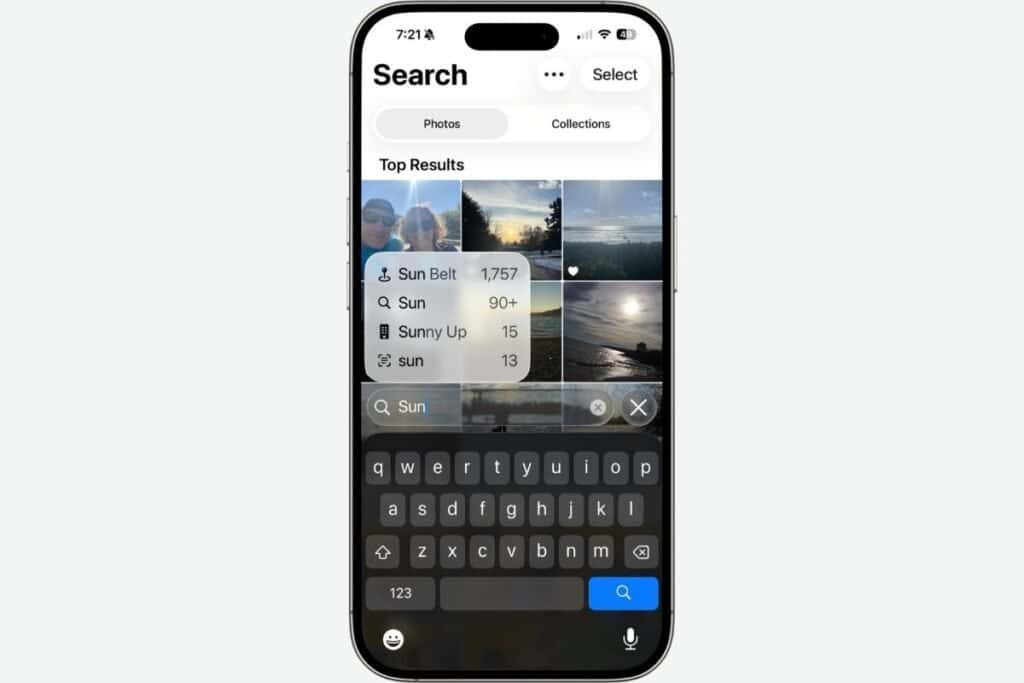
One of the simplest ways to make your photos easier to manage is to stop scrolling and start using search. If you’ve never really used it, it can make a big difference.
Instead of going through hundreds or thousands of photos, you can just type what you’re looking for. It might be a person’s name if you’ve set it up, like a family member or pet. Or something more general like “beach,” “dog,” “birthday,” or even “screenshot.”
Your iPhone is actually pretty good at recognizing what’s in your photos, even if you’ve never organized them before.
This alone can save a lot of time and frustration when you’re trying to find something specific. And once you find what you’re looking for, that’s where the next small habit comes in.
Small Ways to Make Photos Easier to Find Later
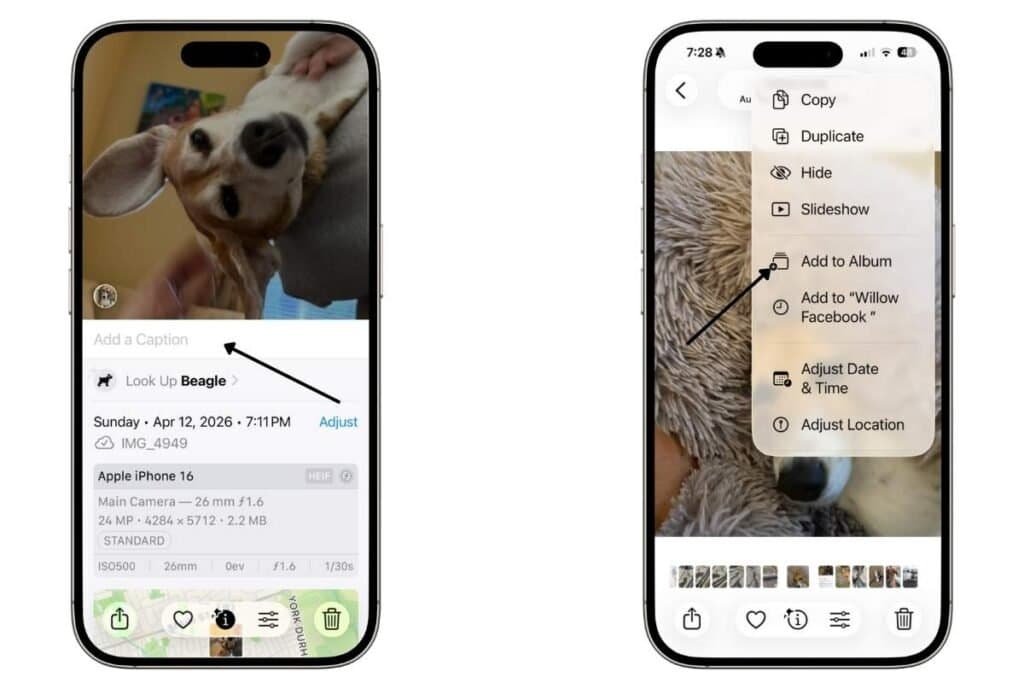
Once you’ve found a photo you want to keep or come back to later, there are a couple of simple ways to make it easier to find again.
One option is to add a caption. This is just a short note that helps you remember what the photo is about—like where it was taken, who is in it, or why it matters. It’s especially helpful for those moments when a photo might not be obvious later on.
Another option is to add it to an album. Think of albums as simple groupings for your photos, like trips, family moments, or events you want to keep together in one place.
And while you’re doing that, it’s also a great moment to do a quick little clean-up. If you notice a few extra shots of the same thing, or a photo that didn’t really turn out, this is an easy time to delete them. Nothing big—just the obvious ones you don’t need.
You’re already looking at those photos anyway, so it becomes less about “organizing” and more about making small decisions as you go.
You don’t need to do this for everything. It’s just for the photos you actually care about finding again later.
If you’re not sure how to do add a caption, or create an album, I go into the step-by-step process in my other posts: How to Organize Photos on iPhone: Simple Tips Part 1 and 2.
Why Small Photo Habits Matter More Than Big Cleanups
If there’s one thing I hope you take away from this, it’s that organizing your photos doesn’t need to be a big, overwhelming project. It’s really about the small habits you build into the moments you’re already spending in your camera roll.
Instead of waiting for a perfect time to sit down and sort everything, you slowly make things easier as you go—one photo, one small decision, one quick action at a time.
Over time, those little moments start to add up in a way that actually makes a difference. And your future self will feel it when you’re not endlessly scrolling to find something important, but can actually locate it in just a few seconds.
It doesn’t need to be perfect. It just needs to be a little easier than it was before—and that’s enough to make a real change.
If you’ve enjoyed this post, stick around! I share new iPhone guides, tricks, and step-by-step tips every week. Subscribe below and follow me on Facebook and Instagram so you never miss out.

Gail Kerr
IT Professional and Technical WriterTechnology has been a part of my life for as long as I can remember. I have over 28 years of experience providing computer support in large corporations and small businesses. I went back to school in 2009 to get an Associate Certificate in Technical Writing so I could take my love of tech and become proficient at writing clear and easy to understand documents for people of all levels. I’ve become the go to person for family and friends whenever they have tech questions or challenges.

